

Overview
You can configure webhooks to get real-time notifications as events happen across your Juniper Mist organization or within a particular Juniper Mist site.
You may know webhooks as user-defined HTTP callbacks, HTTP posts, or HTTP notifications. These notifications include event details that you can use in your own applications or third-party software.
Webhook Vs. API Calls
As you begin working with webhooks, it can be helpful to compare them with APIs. APIs work on a pull or polling model. You create an API call, and Juniper Mist responds with the requested data. In contrast, webhooks work on a push model. After you configure a webhook, you receive data as events occur.
| REST APIs | Webhooks | |
|---|---|---|
| Model | Pull or polling model | Push model |
| Limit | 5000 per organization per hour | No limit |
| Operations | Pull statistics, create configuration, update configuration | Push alerts and key statistics |
| Coverage | 100 percent | Alerts, key events, or location |
| Recommended use cases | Automation, configuration | Integration with third-party monitoring tools or business applications |
NOTE: The concepts of alerts and alarms are considered interchangeable. However, when configuring an alert, you should make note of the alert or alarm syntax and use what is displayed.
NOTE 2: The Push Model of the webhook means the Mist Cloud must be able to directly send the messages to the Webhook collector (the Webhook Collector must be exposed to Internet). Information to secure the Webhook collector are available in the Webhook Security Chapter.
Generic description of the webhooks can be found in the Juniper Documentation portal
Webhook Flow
As opposed to clients polling and pulling information from the API, Juniper Mist pushes webhooks to a target webhook URL. There, underlying services can collect, store, or parse the message for specific data and then perform actions on the infrastructure automatically.
This image shows the stages of data flow for webhooks.
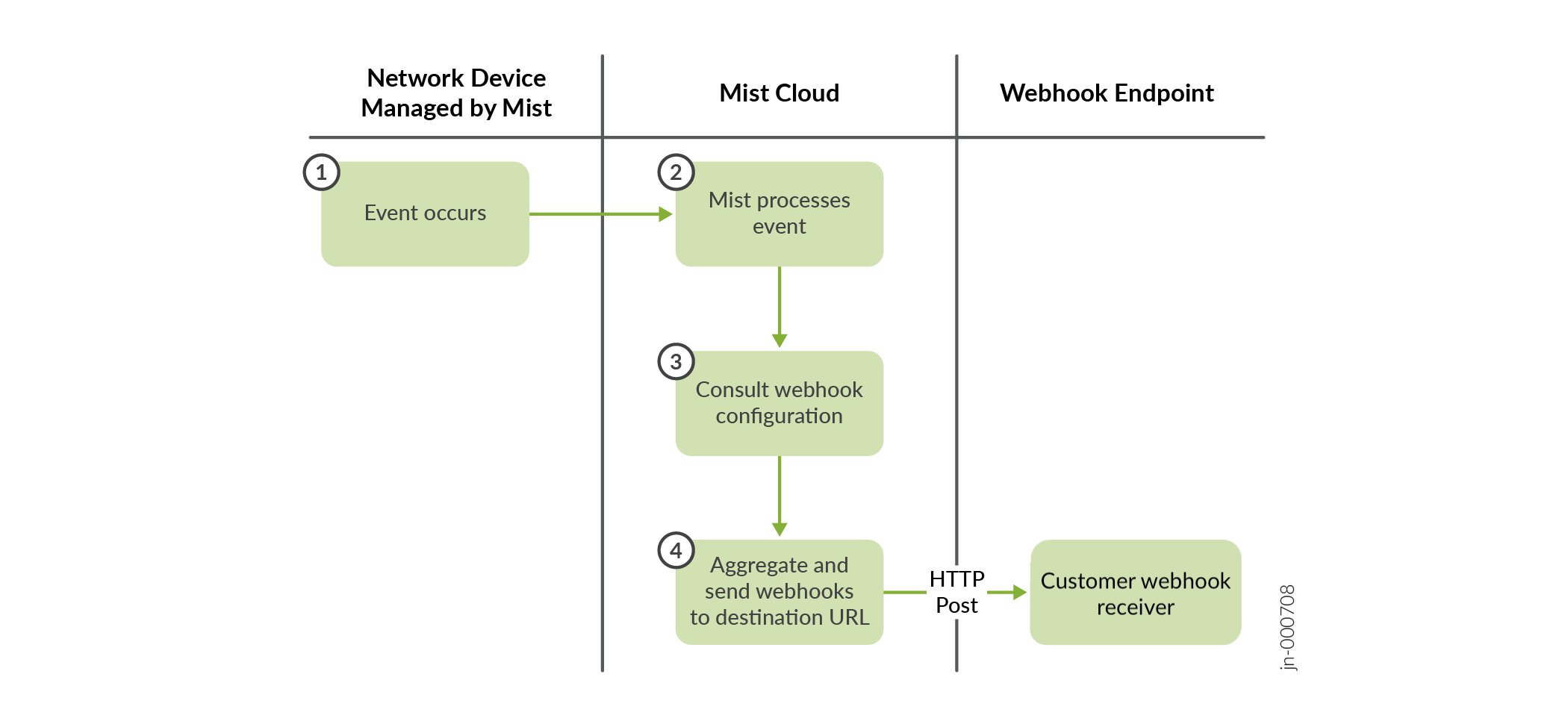
- An event occurs on a network device that Juniper Mist manages.
- Juniper Mist processes the event and checks the current webhook configuration for a match.
- If Juniper Mist finds a match, it sends the webhook to the endpoint URL as configured.
- If multiple events for a specific topic occur within a certain timeframe, Juniper Mist aggregates the events and sends them in a single message.